Introduction
After every exhibition, sales teams collect valuable contacts. In many companies, the next step is still the same: someone manually types business card details into Excel. This process can slow down lead response and create confusion when multiple team members are involved, especially when teams need a reliable exhibition follow-up system.
When follow-ups are delayed, leads go cold. When sheets are messy, priorities are unclear. And when updates are missed, opportunities disappear. That is why more businesses are now comparing CRM vs Excel for exhibition lead management and evaluating best CRM for exhibitions options.
CRM solutions hub
Browse use-case pages — business card scanning, trade shows, manufacturing, real estate, and more — all linked from the central CRM solutions hub so programmatic pages stay connected to your main exhibitors story.
Why Businesses Use Excel
Excel is still common for exhibition leads because it is:
- Easy to start without setup
- Familiar for most teams
- Low cost in the beginning
For small volumes, it may look enough. But as lead count and team size grow, spreadsheet management becomes harder to control.
Problems with Excel for Exhibition Leads
- No clear team visibility on who owns which lead
- Difficult and inconsistent follow-ups
- Duplicate entries and data mismatch
- No reminders for next actions
- Business cards remain unorganized or disconnected from lead history
As a result, teams spend more time managing sheets than converting leads.
CRM for Exhibition Lead Management
A CRM is built to handle ongoing lead workflows, not just store rows of data. For exhibition teams, that makes a major difference. The right exhibition CRM software gives a clear process for lead ownership, updates, and conversion visibility.
How CRM improves execution
- Centralized lead management in one dashboard
- Faster follow-ups with assigned ownership
- Team collaboration with shared notes and updates
- Lead tracking from first meeting to conversion
For teams looking to manage exhibition leads efficiently, CRM brings structure to trade show lead management without adding manual complexity.
Business Card Scanning: A Critical Feature
Manual typing of business cards takes time and introduces errors. During busy exhibition periods, this delay can decide whether a lead converts or not.
Why scanning matters
- Typing details by hand wastes valuable follow-up time
- Scanning cards directly into CRM is faster and cleaner
- Teams can start outreach quickly while interest is still high
With platforms like Frenzin CRM, businesses can digitize card details faster and move leads into follow-up workflows without waiting for manual data entry. A practical business card scanning CRM setup also keeps contact details cleaner for trade show lead management.
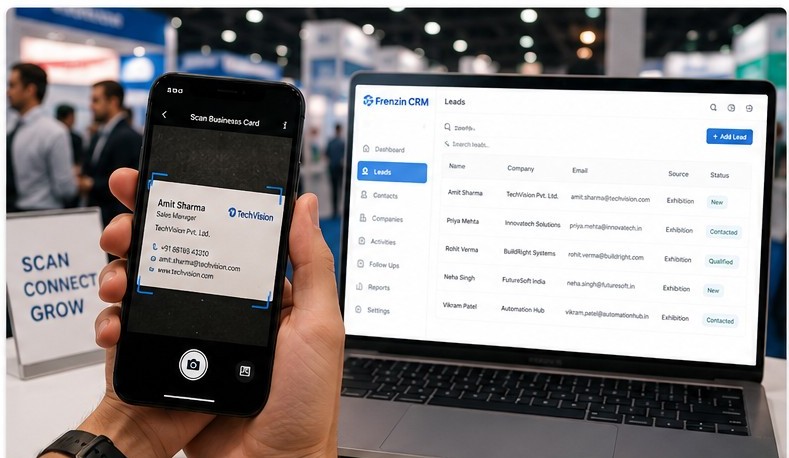
Comparison Table: Excel vs CRM
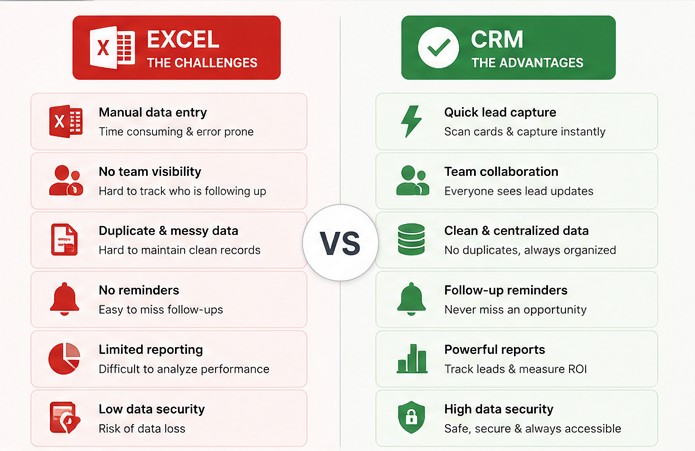
| Criteria | Excel | CRM |
|---|---|---|
| Speed | Manual updates take time | Fast capture and quick updates |
| Lead Tracking | Basic rows, limited status control | Stage-wise tracking and history |
| Reminders | Not built-in for lead follow-up | Automated reminders and tasks |
| Collaboration | Version confusion across files | Shared real-time access for teams |
| Business Card Handling | Manual typing from cards | Card scanning and direct lead creation |
| Reporting | Manual reports and formulas | Built-in reports and performance views |
Real Exhibition Workflow with CRM
Step 1: Collect leads
Capture every visitor interaction during the event.
Step 2: Scan business cards
Convert card details into digital lead records instantly.
Step 3: Organize leads
Tag leads by priority, source, and intent so teams know what to do next.
Step 4: Follow-up
Assign tasks and reminders to ensure no lead is missed.
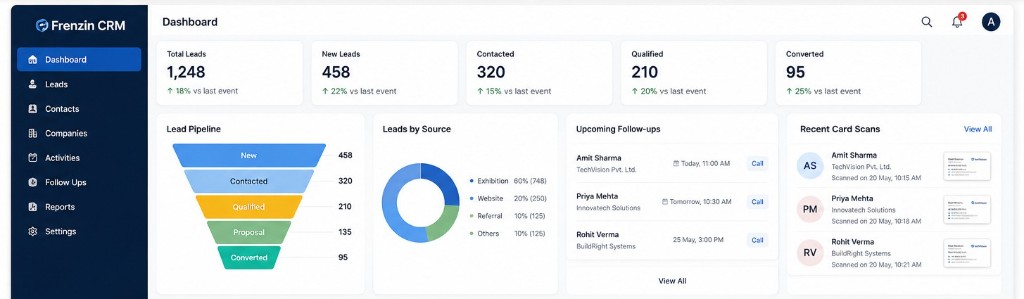
Why Faster Follow-up Improves Exhibition ROI
At most exhibitions, leads speak with multiple vendors before making a decision. If your response is delayed, the lead often moves forward with a competitor who followed up first.
Manual Excel updates can slow response time because data entry, sorting, and assignment happen late. With an organized exhibition follow-up system, teams can act quickly and improve exhibition ROI through consistent post-event engagement.
When trade show lead management is handled through a structured CRM process, follow-up quality improves and opportunities are less likely to be lost.
- Better response rates
- Faster meetings after exhibitions
- Higher conversion opportunities
Who Should Use CRM for Exhibition Lead Management?
CRM is especially useful for organizations that need speed, consistency, and visibility after events. It is a strong fit for:
- Businesses attending multiple exhibitions
- Sales teams managing large lead volumes
- Companies still using Excel or manual notes
- Teams needing follow-up tracking
- Businesses using business cards heavily
For growing teams, exhibition CRM software can reduce manual effort and create a dependable post-event process.
Frequently Asked Questions
Is Excel enough for lead management?
It can work for a very small lead volume, but exhibition teams usually need reminders, ownership tracking, and visibility that spreadsheets do not handle well.
Why use CRM after exhibitions?
CRM helps your team follow up faster, collaborate better, and track lead progress from first contact to conversion.
How to digitize business cards?
Use a CRM with business card scanning so contact details are captured quickly without manual typing.
Which CRM is best for exhibitions?
Choose a CRM that supports rapid lead capture, reminders, collaboration, and easy post-event tracking. Frenzin CRM is one option built for this process.
Related Blogs
See How Faster Follow-up Improves Conversions
Still managing exhibition leads in Excel?
See how business card scanning, centralized lead tracking, and faster follow-ups can simplify your post-event workflow.
Book Free Demo