
Production Management Software
Plan Production. Track Every Process. Deliver on Time.
Manage production planning, work orders, processes and manufacturing progress from one simple dashboard. Monitor every stage of production and keep your team on schedule.
Frenzin Production Management Software is built for manufacturing teams that need a clear production management system. Factories that also manage stock can explore inventory management software for manufacturing. Sales and follow-up teams can explore Frenzin CRM. For customer communication, see Explore Bulk Email Marketing and Explore Bulk WhatsApp.
Everything You Need to Manage Production
A practical manufacturing management software view of planning, work orders, processes, resources and production reports — without extra complexity.
Production Planning
Plan upcoming production activities and organize work according to available resources.
Work Order Management
Create and track work orders with planned quantity, completed quantity, status and due dates.
Process Tracking
Track production through different stages and understand exactly where work is currently positioned.
Resource Utilization
Monitor machines, workstations and other production resources.
Inventory Monitoring
Keep an eye on material and inventory availability required for production.
Quality Control
Track quality checks and monitor production quality performance.
Production Reports
View production performance and understand output, delays and efficiency.
Alerts & Delays
Identify delayed work orders and production issues that require attention.
How Production Tracking Software Works
A simple four-step path from production planning to monitoring and improvement.
Plan Production
Define what needs to be produced and plan the required production activities.
Create Work Orders
Assign work orders with quantities, processes and expected completion dates.
Track Every Process
Monitor progress through stages such as Cutting → Polishing → Grinding → Packaging. These are examples — your processes can be different.
Monitor & Improve
Use dashboards and reports to monitor production output, delays, resources and efficiency.
Track Production From Start to Finish
Manufacturing workflow software should make the full path easy to follow: planning, work order, processing, quality check, packaging and completed production.
Planning
Production requirements are planned.
Work Order
Jobs are assigned and tracked.
Processing
Production moves through defined processes.
Quality Check
Production quality is reviewed.
Packaging
Completed items move toward dispatch.
Completed
Finished production is recorded.
See Your Production Floor at a Glance
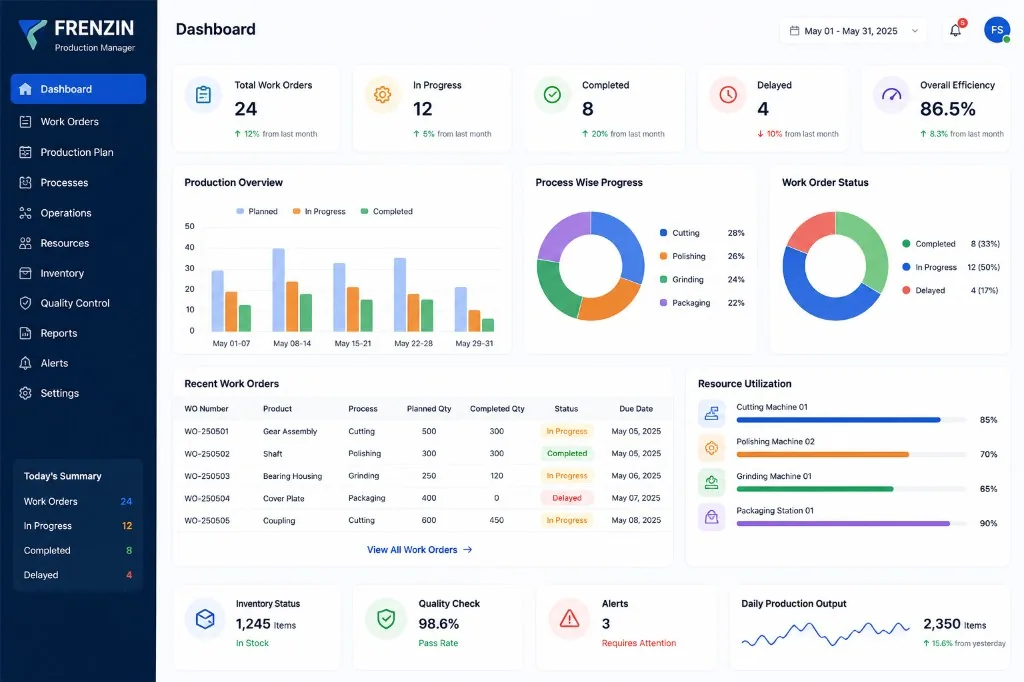
Get a real-time view of work orders, production progress, process performance, resource utilization and production output from one centralized dashboard.
Dashboard preview for illustration. Sample figures in the graphic are demonstration values, not live Frenzin customer statistics.
Manage Every Work Order in One Place
Production teams can track each work order from planning through completion. Shop floor management software should make job status easy to check without calling around the factory.
| WO Number | Product | Process | Planned Qty | Completed Qty | Status | Due Date |
|---|---|---|---|---|---|---|
| WO-1042 | Gear Assembly | Cutting | 120 | 68 | In Progress | 12 May 2025 |
| WO-1043 | Shaft | Polishing | 80 | 80 | Completed | 10 May 2025 |
| WO-1044 | Bearing Housing | Grinding | 60 | 22 | In Progress | 15 May 2025 |
| WO-1045 | Cover Plate | Packaging | 200 | 40 | Delayed | 08 May 2025 |
Sample work orders for illustration. Your live work orders, products, processes and dates will come from your own production data.
- Work order number
- Product
- Process
- Planned quantity and completed quantity
- Status and production progress
- Due date
Monitor Every Production Process
Manufacturing operations can be divided into individual processes. Process-wise progress helps supervisors see pending quantities, completed quantities, delays and production efficiency at each stage.
Process names depend on the business. A fabrication shop, a component manufacturer and a job-work unit may all use different stages.
These are examples only. Your production processes can be set according to how your factory actually works.
What you can review
- Process-wise progress
- Pending quantities
- Completed quantities
- Delays at a process
- Production efficiency by stage
Know How Your Resources Are Being Utilized
Resource visibility helps production managers understand workload across machines, production stations, operators, production lines and work centers recorded in the system.
Machine Utilization
See how recorded machines and stations are being used against current work.
Production Capacity
Understand whether work is concentrated on a few resources or spread across the floor.
Workload
Review open work against resources so supervisors can balance daily production.
Resource Availability
Keep a simple view of which work centers are busy and which still have capacity.
This is resource utilization visibility from production records. It is not automatic machine integration, IoT monitoring or AI scheduling.
Inventory Monitoring
Know whether required materials and items are available for production. Inventory status on the production dashboard helps planners check availability before work is committed. For deeper stock control, factories can also use Frenzin Stock Management Software.
Quality Control
Monitor quality checks and identify issues before they affect production delivery. Quality performance sits beside work orders so supervisors can see pass rate and checks that need attention.
Make Better Production Decisions With Data
Production scheduling software and monitoring views are most useful when managers can see output, delays and process performance together. Reports help you review the floor without waiting for end-of-day verbal updates.
Output
Review daily and period production output from the dashboard and reports.
Completion
See which work orders are completed, still in progress or delayed.
Bottlenecks
Use process and delay views to find stages that need attention.
Built for Manufacturing Businesses
Designed for factory owners, production managers, supervisors and operations teams in India who need production management software they can actually use on the shop floor.
Small & Medium Manufacturers
Manage production without relying on spreadsheets and disconnected records.
Engineering & Fabrication Businesses
Track jobs through multiple manufacturing processes.
Component Manufacturers
Monitor work orders and production quantities.
Machinery & Industrial Businesses
Track production stages and resources.
Job Work Businesses
Manage customer jobs and production progress.
Multi-Process Manufacturing
Track products moving through multiple production stages.
Why Choose Frenzin Production Management Software?
A practical production monitoring software for manufacturing teams that need planning, tracking and reports in one place.
Simple to Use
Designed for practical manufacturing teams.
Real-Time Visibility
Know what is planned, running, completed or delayed.
Process-Level Tracking
Track production at every stage.
Better Resource Visibility
Understand how machines and resources are being utilized.
Centralized Information
Keep production information in one place.
Better Production Decisions
Use reports and dashboards to identify bottlenecks and improve efficiency.
Example Production Workflow
One common manufacturing production software path is shown below. The actual workflow can differ based on the manufacturing business, product mix and shop-floor practice.
- Raw Material
- Cutting
- Polishing
- Grinding
- Quality Check
- Packaging
- Completed
Use this as a starting example. Your factory may add assembly, inspection, finishing or other processes.
Frequently Asked Questions
What is production management software?
Production management software helps manufacturing businesses plan production, create work orders, track processes and monitor progress from one place. Instead of relying only on spreadsheets or verbal updates, teams can see what is planned, running, completed or delayed.
What is production planning software?
Production planning software helps you organise upcoming production activities and workloads. With Frenzin, you can plan what needs to be produced, assign work orders and keep production activities visible to the shop floor and management team.
Can I track work orders?
Yes. Work order tracking lets you review work order number, product, process, planned quantity, completed quantity, status and due date, so production teams can follow each job from planning through completion.
Can I track different production processes?
Yes. You can track production through the processes used by your business. Cutting, polishing, grinding and packaging are examples only. Process names can vary depending on the factory, product and workflow.
Can I monitor production delays?
Yes. Delayed work orders and production issues can be identified from the dashboard and alerts view, so managers can see which jobs need attention before delivery dates are missed.
Can production management software help monitor machines?
The software helps you review resource utilization for machines, production stations and work centers recorded in the system. It shows how resources are being used. It does not automatically connect to machines or collect IoT sensor data unless that is set up as a separate project.
Is production management software useful for small manufacturing businesses?
Yes. Small and medium manufacturers can use it to keep production planning, work orders and process progress in one production management system, instead of tracking jobs across notebooks, WhatsApp messages and spreadsheets.
Can I request a demo?
Yes. You can request a demo from this page or through our contact form. A Frenzin team member will walk you through production planning, work order tracking and the dashboard.
Get started with Production Management Software
Tell us about your factory and production flow. We will walk through the dashboard and a product demo.
Take Control of Your Production
Plan production, track work orders and monitor every process from one centralized production management system. Related tools: Explore Frenzin CRM, Explore Bulk Email Marketing, Explore Bulk WhatsApp, Explore Visitor Book, Contact Us.
Get Started Now Request Demo